Your code and your live site
Connect a repository you own, or start from a ready-made project with no repository at all. The crew works on its own branch, and nothing goes public until you confirm it.
On every plan
What it is
Maria runs a bakery and has never written code. She wants a website, and she wants to be sure that whatever the crew builds does not land on the internet before she has seen it. Georgi is a developer with a repository, which is the folder where his project's code lives, and he wants the crew's work to arrive the way a teammate's would, as a change he can review.
This feature covers both. It decides where the code lives, how a finished piece of work gets out of the crew's hands, what is checked on the way, and how a site goes live at an address like mariasbakery.shipitfam.com.
Two ways to start
With a repository, you connect a GitHub or Gitea repository you own. Without one, you start from a ready-made project: Landing page, Landing page with a signup form, Static blog, Founder one-pager, Weekly business report and others. The code is kept for you in the project's workspace, and if you link a repository later, the work is published to it.
Maria starts from the landing page. She never opens a repository, and the crew still has somewhere safe to keep her code.
The Deck
The Deck is the screen that shows the crew's work. It has four lists: Needs you, In progress, Up next and Done. Each finished mission, which is one job you gave the crew, shows a summary, its cost and a link to its pull request. A pull request is a proposed change that a person reads before it joins the main code. The preview and the live site's bar sit on the same screen.
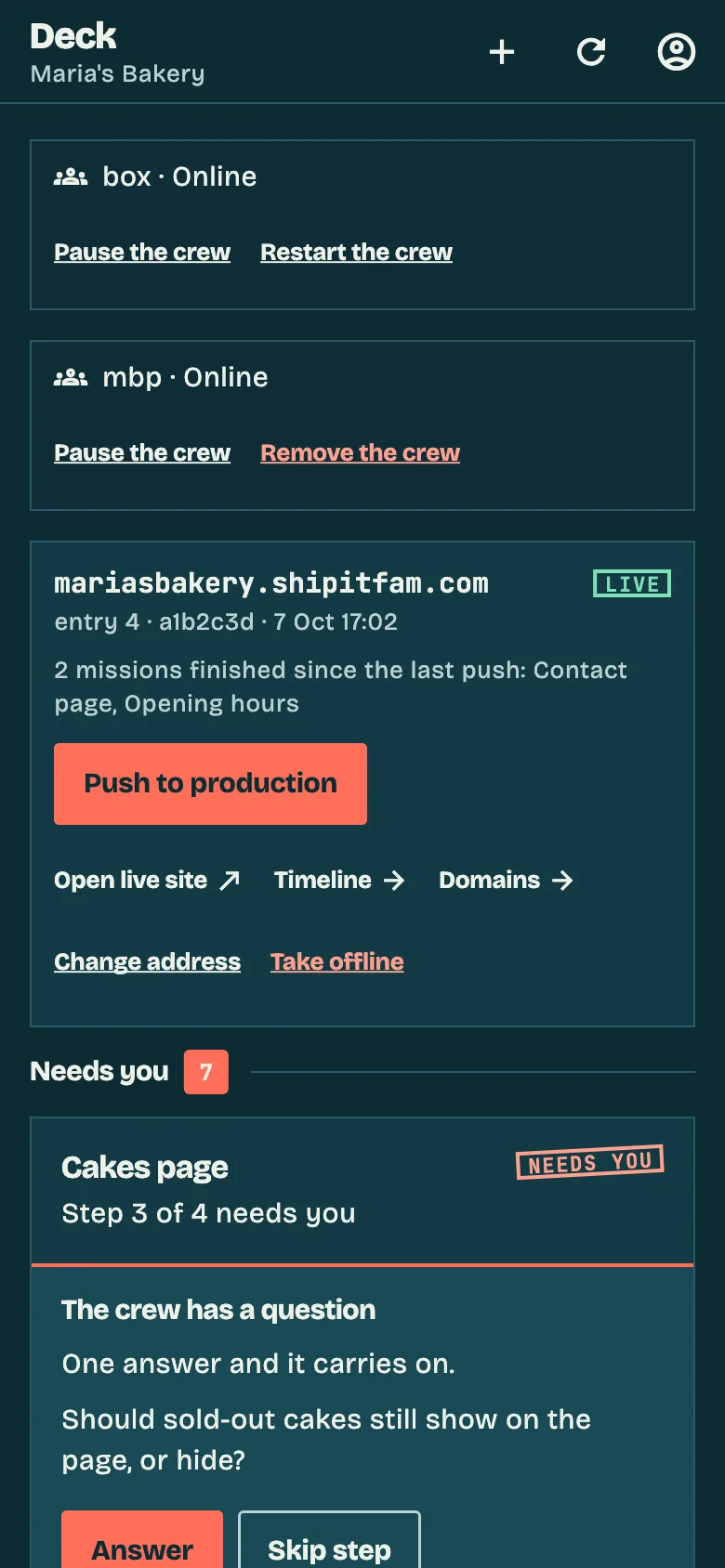
Preview and live site
A preview is the mission's work running at a link you can open on your phone before anything is public. Maria taps it, looks at her new menu page, and types what to change if something is off.
When she is happy, she claims an address and taps Push to production. The app asks her to confirm. Every push adds a line to the timeline, and any of the last ten can be made live again with one tap, labelled "Go back to this version". A push that fails changes nothing.
A live site is static pages: HTML, CSS and JavaScript. A form on it sends to a form service such as Formspree or Tally, which emails you.
What is checked before a step is done
A step is one short run with one task. Before a step counts as done, a security scan reads what it changed. Gitleaks looks for secrets such as passwords, Trivy and osv-scanner look for dependencies with known vulnerabilities, and Semgrep reads the code itself.
A finding blocks the step and asks you what to do: fix it, retry, or accept the risk. Accepting a risk is for the project's lead only.
For developers
Each mission works on its own branch. Nothing is pushed until the mission ships. Shipping merges the latest main into the branch, pushes without force and opens a pull request. The body of the pull request is the spec, the plan and a summary of each step.
- You choose whether shipping asks you first ("Ship it?"), happens on its own, or is off.
- Per step, you can read the diff in the app.
- Optional auto-merge waits for green checks. It never merges a pull request whose checks have not run.
The repository stays yours. Georgi reviews the crew's pull request the way he reviews Mira's.
On each plan
| Plan | Your code and your live site |
|---|---|
| Free | Repository or starter project, branches, pull requests, security scan, the Deck. The crew runs on your own computer. No preview link and no live site. |
| Builder | Everything in Free, plus preview links and a live site at name.shipitfam.com. |
| Fleet | Everything in Builder, on a dedicated server that is always on. |
GitLab and Bitbucket, and your own domain, are on the roadmap.
Related
Ready to see it on a real address?
Join the waitlist. We'll let you in as soon as there's a spot.
Join waitlistNext feature: Teams →