The plan
You approveBefore any code exists, you read the plan. A second AI (Fammy, our parrot) has already checked it for gaps. Approve it, change it, or send it back.
Letting an AI work on your project raises fair questions. Can it break something? Where does my code go? Who can see my login? Here are the straight answers.
Explained for people with an idea.
No. It stops in three places and waits for you.
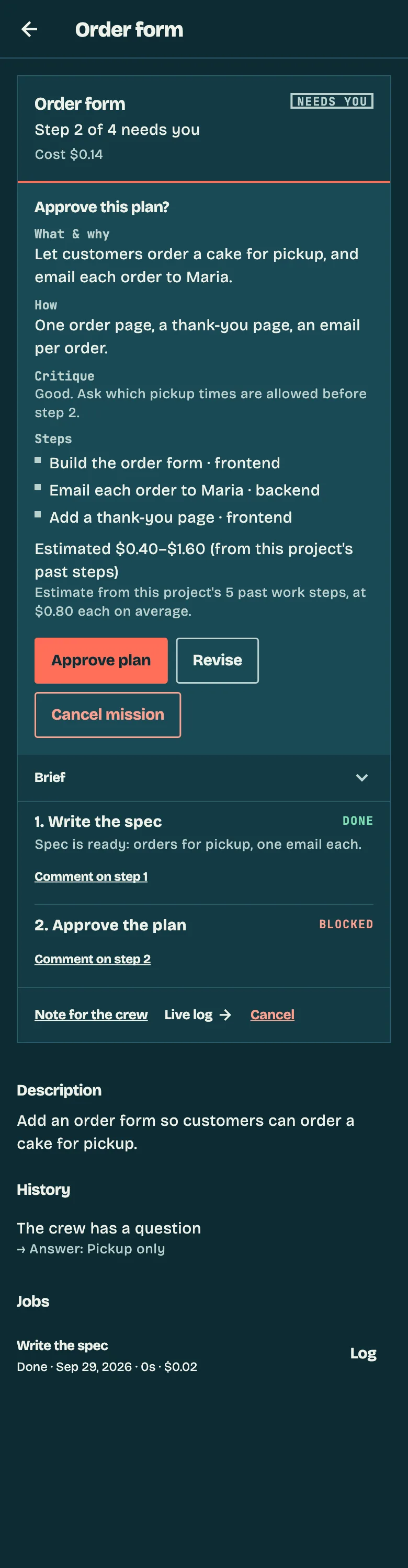
Before any code exists, you read the plan. A second AI (Fammy, our parrot) has already checked it for gaps. Approve it, change it, or send it back.
Deleting things for good, using admin rights, pushing code, publishing, or connecting to other machines: it stops and asks. Allow it once, or say no with a note.
For example rm -rf, sudo, git push and npm publish. Editing a .env file asks too.
You see a preview and what changed. Ship it, send it back with a sentence, or don’t ship.
Only a project lead can connect a Claude login or publish to production.
On Builder and Fleet, the AI works inside a sealed-off container.
Every time the AI finishes a piece of work, security scanners check it before it counts as done. The AI doesn’t grade its own work.
After every build step
Nothing found
The work moves on. Nothing for you to do.
Something found
You get a list of each problem: where it is, how serious it is and how to fix it. Tap Fix and the AI fixes it.
No. When it works on your computer, it sees your project and nothing else.
It reads the files of the project it works on. Your documents, photos and other projects are out of its reach.
Files that hold passwords and keys are off limits, even inside your project.
If your own Claude can reach your email, your bank or other tools, the AI working for ShipItFam can’t. It starts with none of them.
When it runs a command, it runs in a sealed box that holds only its copy of your project.
When your Kraken (the ShipItFam app on your computer) starts work, it takes the jobs you approved and nothing else. A job someone else sends you waits for you.
A message from a teammate can’t give orders to your AI. ShipItFam marks other people’s words as something to read, never instructions to follow.
If your own Claude can pay or send mail for you, give it a separate Claude profile from the one you code with.
Into a repository you own, and nowhere else until you say so.
Each job works on its own copy of your project, so your live version is never touched while it works.
When you connect a repository, it starts on “ask me first”, so it checks with you before sending anything.
Start from a ready-made project and connect a repository later, when you want to.
The access key for your code host never reaches the AI or the commands it runs.
It asks you to confirm, and one tap undoes it.
Your code stays where it is. Cancel, and the repository is exactly as the AI left it.
ShipItFam runs on Claude, an AI from Anthropic, signed in as you. You pay Anthropic for Claude and us one flat fee. We don’t resell Claude and we don’t use a hidden account of our own.
Approve a link and paste the code back. No API keys to copy around.
Your login never leaves your computer.
Only your own projects’ crews use it. It is never resold and never written to logs.
Sign out from the app and it is gone.
It is the real Claude Code login, the one claude login creates. No long-lived token in an environment variable.
Only what the app needs to show you your work.
Your email address, from signing in.
What you asked for, the plan, a summary of each step, what changed and the live log, so you can follow along from your phone.
It lives in your repository. The AI works on a copy: in its own workspace on Builder and Fleet, on your computer on Free.
They go to Anthropic through your own login, under Anthropic’s terms.
We don’t sell your data, and we don’t train any AI on your code.
Want a copy of your data, or want it deleted? Email privacy@shipitfam.com.
Found a security problem? Tell us on the contact form and pick “Security or privacy”.
Ask us. Someone who builds ShipItFam will answer.