Plans and Fammy
Every mission starts with a written spec and a plan. Fammy, the crew's parrot, critiques the plan, and you approve it before anything is built.
On every plan
What it is
When you hand a job to an AI, the usual result is a finished pile of work that misses what you meant. You find out at the end, after the time is spent.
ShipItFam moves that moment to the start. A mission is one job you give the crew, which is the AI team working on your project. Before the crew writes any code or builds any page, it writes down what it understood and how it will do the work. You read that, and you decide.
The spec comes first
The first step of a mission belongs to the product owner, a rank, which is a role on the crew. It turns your sentence into a spec with four parts: the goal, the scope, what is out of scope and the acceptance criteria, which are the tests that decide whether the job is done.
The product owner asks at most four questions, and only the ones that block the spec. It checks the treasure map first, which is the project's notebook, and does not ask what is already answered there. For a developer's project it searches the code first and says what already exists.
The plan
The second step belongs to the architect, who writes the plan: the approach, the files and modules involved, the risks and a test plan. The work is split into 1 to 12 steps. A step is one short run with one task, small enough to finish in one go, and each step is given to a rank.
- A change with a screen starts with two designer steps.
- Anything testable gets a QA step.
- Large or risky changes get two review steps.
Fammy
Fammy is the crew's monocled parrot. Before you see a plan, Fammy reads it and writes a critique of one to four sentences. Fammy looks for over-engineering, things nobody asked for, vague steps and steps in the wrong order. Fammy never rewrites the plan. The critique sits next to the plan so you can weigh it yourself.
The card you get
Maria asks for a page that lists this week's cakes on mariasbakery.shipitfam.com. When the plan is ready, a card arrives on her Helm, the feed of things that need her.
The crew has a plan
Approve this plan?
The card shows what the mission is and why, how it will be done, the steps and Fammy's critique. Approve plan starts the work. Revise lets you type what to change in a sentence, and the architect writes a new plan. Cancel mission stops it. Nothing is built before you approve.
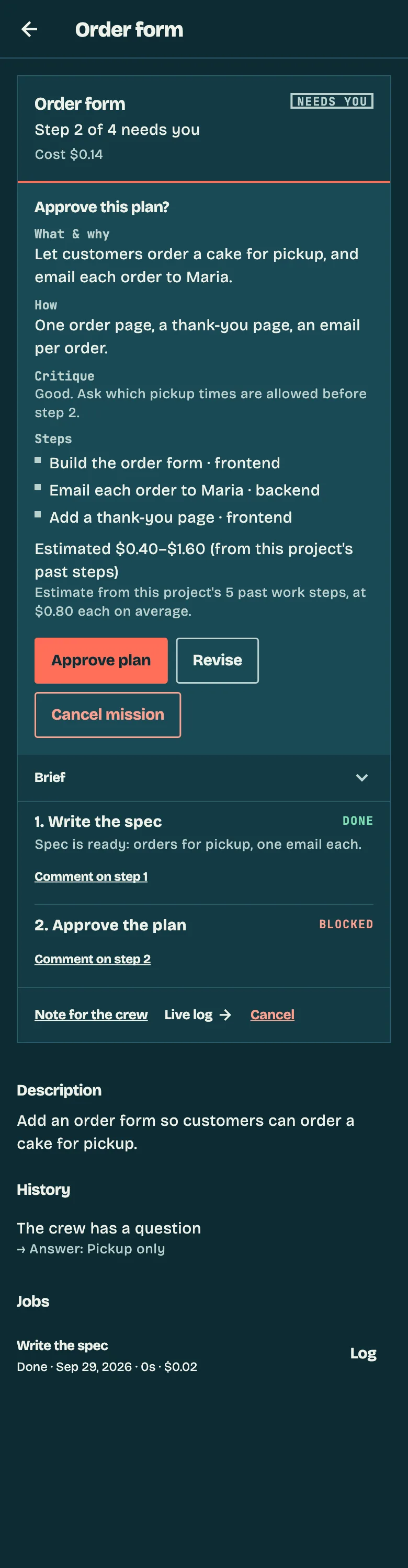
The card also shows a cost estimate in dollars, as a range. It is worked out from what this project's past steps cost, so it appears once the project has at least three finished steps to learn from.
Settings and quick tasks
- Plan detail. Coarse, Normal or Fine, which sets how finely the architect splits the work.
- Mission budget. A limit in dollars for a mission.
- Plan approval. On by default. The owner can switch it off.
A quick task skips the plan. You create the mission as a single work step, which suits a typo or a colour change.
For developers
On a project with a repository, the product owner searches the code before it writes the spec, so Georgi hears "the refund function already exists in this file" before anyone proposes writing a second one. The plan names the files and modules the architect expects to touch, and the test plan is written before the QA step runs. Revise sends the plan back to the architect before any step runs.
On each plan
| Plan | Plans and Fammy |
|---|---|
| Free | Spec, plan, Fammy's critique and approval. The crew runs on your own computer, started with npx shipitfam work. |
| Builder | The same, with the crew in ShipItFam's cloud. It sleeps between jobs and wakes in about 20 seconds. |
| Fleet | The same, on a dedicated server that is always on. |
Every plan runs on your own Claude subscription, and ShipItFam adds no markup on Claude.
Related
Want to read the plan before the work starts?
Join the waitlist. We'll let you in as soon as there's a spot.
Join waitlistNext feature: The Helm →