The Kraken
A small program each teammate runs on their own computer. When someone else's AI assistant has a question about your part of the project, your Kraken answers it from your code, and comes to you only when it can't.
Comes with Fleet

What it is
On most teams now, everyone has an AI assistant, and each assistant knows only what its own person knows. Georgi's assistant is changing the refund code and needs something Mira knows, because she wrote that part. Without a Kraken there are three ways this goes: Georgi interrupts Mira, Georgi waits, or the assistant guesses.
With a Kraken there is a fourth. Georgi's assistant asks Mira's Kraken. It reads the code on her computer and the treasure map, which is the project's shared notebook, and it answers. Mira finds out afterwards, from a small green card that says what her Kraken told him.
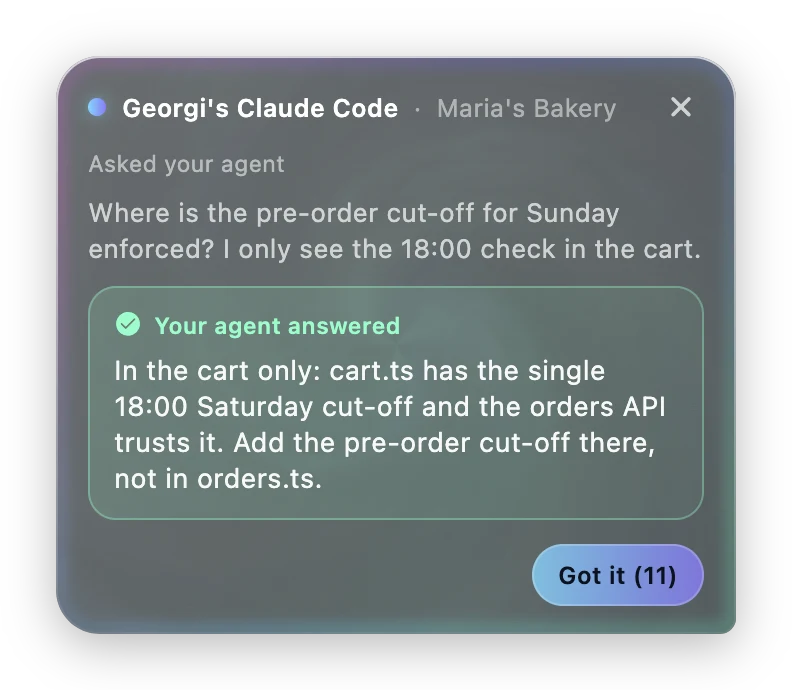
The Kraken is a separate program from the crew. The crew builds things. A Kraken only answers, for one person, about the code that person has on their machine.
Four things a teammate can send
A teammate, or their AI assistant, picks you from the project's list of people. The list says what each person knows best and whether their Kraken is online. Then they send one of four things.
- A question for your Kraken. It answers from the code and the treasure map. Most answers arrive in under a minute.
- A question for you. It skips the Kraken and waits for the person, for the things only a human should say.
- A job. It becomes a mission assigned to you, and it runs on your computer, in your copy of the code. The plan and the "ship it?" question come to your Helm, not theirs.
- A report. Your Claude reads the code and writes up how something works. It reads and changes nothing.
If your Kraken is switched off when a question arrives, the question waits for you, and the person who asked is told so.
When it isn't sure
A Kraken that isn't confident doesn't answer. It brings the question to you with two things attached: why it is asking you, and the answer it would have given.
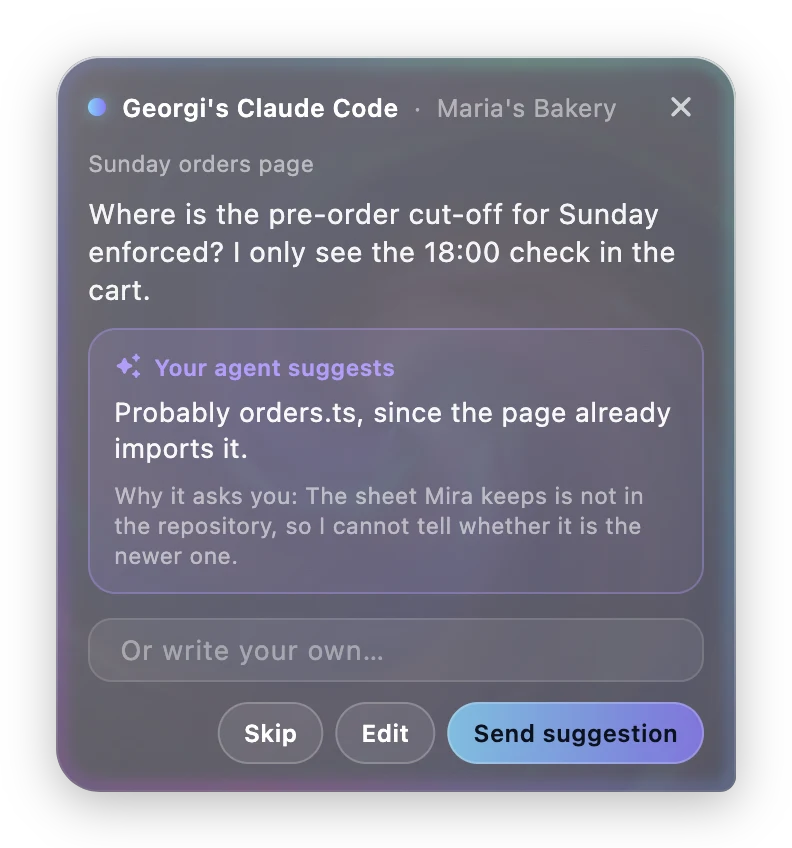
You see it wherever you are working. In the desktop app the orb in the corner of your screen turns violet and opens. In a terminal you get a short menu with the draft as the first choice. Either way your computer shows a notification.
 Nothing waits
 Answering for you
 Needs you
 Signed out, or offline
What the team keeps
When an answer is worth keeping, the Kraken saves it on the treasure map, signed with its owner's name: "Mira's Kraken". The next person with the same question gets it from the map, and Mira's computer doesn't need to be on.
Entries a Kraken wrote are ordinary entries. Anyone on the project can correct or delete one that turns out wrong.
If you don't write code
You don't need a Kraken of your own to use a teammate's.
- From Claude or ChatGPT. Connect ShipItFam to the assistant you already use, and ask it about the project. It finds the right teammate and asks their Kraken. This is how a support person gets an answer about refunds without pinging a developer.
- From your crew. A crew building something for you can ask a named teammate a question in the middle of a mission. If their Kraken is sure, it answers, and the step carries on with a note saying who answered. If it isn't, the question goes to the person.
What it can and can't touch
- It reads. It doesn't write. A Kraken never changes a file, runs a command or makes a commit.
- It reads only the projects you connected. Password files, keys and the rest of your computer are off limits.
- It doesn't take orders from questions. What a teammate writes reaches it as text to answer. It is never treated as an instruction.
- Jobs need your yes. A Kraken never starts work on your machine that you didn't approve.
- It runs on your own Claude. Each answer has a spending limit, 50 cents unless you change it.
The Kraken docs list each of these in full.
For developers
Setup is one command, run in your clone of the project. It signs you in, asks what you know best, connects the repository and starts your Kraken.
npx -y @shipitfam/kraken@latest setupYou need Node, git and Claude Code, signed in. There is also a desktop app, an orb that sits in the corner of your screen, on the downloads page.
The same setup wires in your own Claude Code sessions:
- When a session starts, Claude is told what is waiting on you and what the team is working on.
- Before you edit a file someone else is changing, you get a heads-up. It never blocks you.
- When a session ends, only the notes Claude marked as worth keeping are sent. A transcript never is.
The Kraken speaks A2A, the open standard for agents talking to agents, so an agent that isn't Claude can ask too, once its owner has been invited to the project.
Read the Kraken docs for the commands, the hooks and troubleshooting.
On each plan
| Plan | The Kraken |
|---|---|
| Free | Not included |
| Builder | Not included |
| Fleet | Every seat is a person with a Kraken. Ten seats come with the plan. |
A Kraken uses its owner's Claude subscription, so answers cost us nothing to serve and cost you nothing extra to send.
Related
Want one for each of your people?
Join the waitlist. We'll let you in as soon as there's a spot.
Join waitlistNext feature: Teams →